Документация
Документация
- API Help
- Access and Authentication
- Request Parameter Data Types
- Response formats
- Login API
- Get current IP address
- Get account balance
- DNS hosting
- DNS plan details
- Available name servers
- Register Domain Zone
- Delete domain zone
- List Zones
- Get pages count
- Get zones statistics
- Get zone information
- Update zone
- Update status
- Is updated
- Change status
- Get records statistics
- Records
- Get record
- List records
- Get records pages count
- Add record
- Delete record
- Modify Record
- Copy records
- Import records
- Export records in BIND format
- Get the available record types
- Get the available TTL
- Get records count
- Get SOA details
- Modify SOA details
- Get DynamicURL
- Import via transfer
- Change status
- Reset SOA details
- Notes
- Slave Zones
- Mail forwards
- Cloud domains
- Zone transfers
- Zone Shares
- Query statistics
- Parked Zones
- GeoDNS
- DNS Failover
- Groups
- DNSSEC
- Free SSL
- Notes
- Domain names
- DNSSEC
- Groups
- Check availability
- Domains price list
- Register new domain
- Renew domain
- Transfer domain
- List registered domains
- Get pages count
- Domain information
- Get contacts
- Modify contacts
- Get name servers
- Modify name servers
- Get child name servers
- Add child name server
- Delete child name server
- Modify child name server
- Modify privacy protection
- Modify transfer lock
- Get transfer code
- Get RAA status
- Resend RAA verification
- Get available contact countries
- Sub-users
- Add new sub-user
- Delete sub-user
- List sub-users
- Get sub-user's info
- Add IP
- Remove IP
- Username modification
- Modify status
- Modify password
- Modify access level
- Delegate zone
- Remove zone delegation
- List all zones
- Modify zones group
- Modify records limit
- Modify zones limit
- Modify mail forwards limit
- Modify failover checks limit
- Modify monitoring checks limit
- List monitoring checks
- Modify monitoring group
- Delegate monitoring checks
- Remove monitoring check
- Get pages count
- Monitoring
- Monitoring plan details
- Groups
- Create monitoring check
- Update monitoring check
- List monitoring checks
- Get monitoring checks pages
- Delete monitoring check
- Get uptime changes
- Get uptime changes pages
- Get uptime changes debug
- Get history
- Get history pages
- Create notification
- Get notifications pages
- List notifications
- Delete notification
- Notification repeat interval
- Get monitoring check
- Reset Heartbeat URL
- List all Monitoring nodes
- Set custom mail subject
- Get SMS price
- Monitoring plan resources
- Get available intervals
- Get available regions
- SSL
- Orders
- Open source libs
- Scripts
- Secondary DNS with Plesk
- Secondary DNS with cPanel
- Slave DNS with DA Master
- Slave DNS with Enhance
- Available DNS zones notification
- New Master IP to all Slave zones
- Bulk Records Update
- Delete Cloud domains
- DNS Statistics Reports
- Edit contact details
- Zones Import Via Transfer
- Export DNS zones in BIND format
- Export DNS zones in CSV format
- DNS zone files export
- Add Slave zones with cPanel
- Slave with PowerDNS and pgSQL
- Slave with PowerDNS and MySQL
- PowerDNS Slave zones delete
- Bulk SOA Update
- Convert Cloud to Master zone
- List Slave zones with Master servers
- Zone management with OctoDNS
- Zone management with Terraform
- Zone management with OpenTofu
- Getting Started
- Domain names
- DNS Zones
- DNS Records
- SOA Record
- A Record
- AAAA Record
- MX Record
- CNAME Record
- TXT Record
- SPF Record
- NS Record
- SRV Record
- DS Record
- Web Redirect Record
- Web Redirect with SSL
- ALIAS Record
- RP Record
- SSHFP Record
- PTR Record
- NAPTR Record
- CAA record
- TLSA Record
- CERT record
- OPENPGPKEY record
- HINFO record
- SMIMEA record
- DNAME record
- LOC record
- Wildcard DNS Record
- What is TTL?
- Records templates
- Mail Forwards
- Gmail
- Heroku
- Heroku SSL
- Zoho
- Tumblr
- Blogger
- GitHub
- Microsoft Azure
- Weebly
- Amazon Web Services
- Google Sites
- Google Calendar
- Google Docs
- WordPress
- SupaDupa
- Bitbucket
- Divshot
- ALDRYN
- Instapage
- Enjin
- Fastly
- Format
- atmail
- FastMail
- KickoffLabs
- launchrock
- Mailgun
- paperplane.io
- Tender Support
- Squarespace
- SimplyBuilt
- Shopify
- Pobox
- Ghost
- Office 365
- Yandex
- Minecraft
- mail.ru
- MailChimp
- ImprovMX
- Rackspace Email
- CloudCone
- TeamSpeak
- ForwardMX
- Mailcow
- WIX
- Round-Robin DNS
- Records deactivation/activation
- Dynamic DNS
- Getting Started with Dynamic DNS
- Dynamic DNS scripts for Linux
- Dynamic DNS scripts
- Dynamic DNS for *NIX
- Dynamic DNS for macOS
- Dynamic DNS script for macOS
- Dynamic DNS for Windows
- Dynamic DNS script for Windows
- Dynamic DNS script for Windows with PowerShell
- DynDNS with multiple interfaces
- Dynamic DNS for Synology
- Dynamic DNS with pfSense
- Dynamic DNS with OPNsense
- Dynamic DNS for MikroTik
- Dynamic DNS for Android
- Dynamic DNS with DD-WRT
- Dynamic DNS with FreeNAS
- Dynamic DNS for Generic Router
- Dynamic DNS Notifications
- GeoDNS
- DNS Failover
- Monitoring
- Failover & Monitoring nodes
- DNSSEC
- Mail Forwards
- Reseller's panel
- SSL certificate
- How to order SSL certificate
- Generate CSR on Windows
- Generate CSR on Linux
- Generate CSR on cPanel
- Install SSL on Apache
- Install SSL on NGINX
- Install SSL on IIS 7
- Install SSL in WHM/cPanel
- How to renew SSL certificate
- acme.sh client for Let's Encrypt, ZeroSSL and others
- Let's Encrypt SSL certificates with Certbot
- Issuing a certificate with Cert-Manager
- SSL in VMware Horizon View 7
- How to reissue SSL certificate
- Change verification mail of SSL
- Certificate Transparency
- ACME with OPNsense
- ACME with Home Assistant
- ACME with Proxmox
- Download Free SSL - script
- WHMCS
- Products and Services
- Features
- Profile
- Misc
- Commands
WIX
Description
Wix Mail is an email service that allows you to use a professional email address with your own domain, fully integrated with your website.
How to add
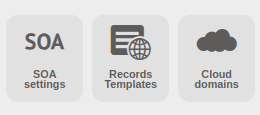
In your ClouDNS account, you need to create a Master DNS Zone. If you do not know how to do it, you can check it here. When your Master DNS Zone is created, go to your DNS Zone Control Panel and find the "Records Templates" button, located between the "SOA settings" and "Cloud domains" buttons. Click on it.
From the orange boxes, click on "Wix".

The following records will be added:
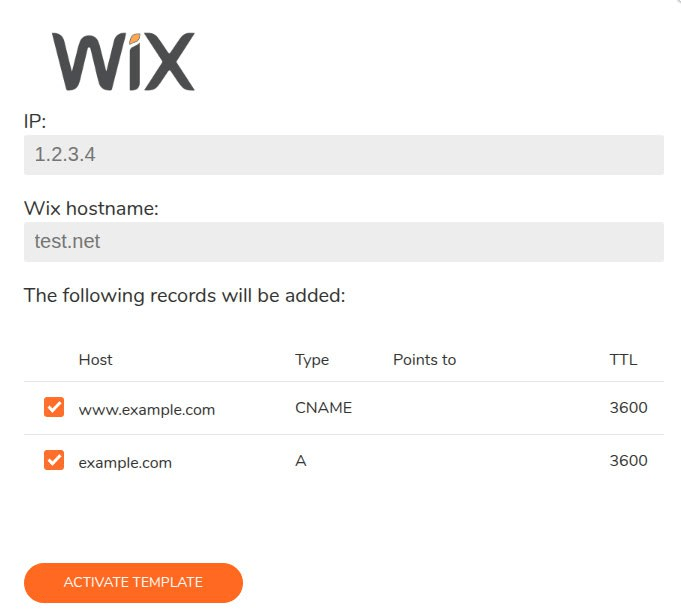
When you click on the "Activate template" button, the records will be added to your zone and the template will be activated. You can edit those records afterwards.
Last modified: 2026-01-27