ACME with Proxmox
Proxmox Virtual Environment is a virtualisation platform designed for the provisioning of hyper-converged infrastructure. Proxmox allows the deployment and management of virtual machines and containers. It is based on a modified Ubuntu LTS kernel.
One of the requirements for the use of Proxmox with ClouDNS is to have access to our HTTP API. All our Premium DNS and DDoS Protected DNS plans include access to the HTTP API and can be used to generate free SSL certificates with Cerbot for any hostname you need. Another important condition is, that your domain is delegated to our name servers and the DNS for the domain name is hosted on our side.
How to configure ACME with Proxmox
- Install Proxmox from here.
- Install ACME Plugin if not already installed.
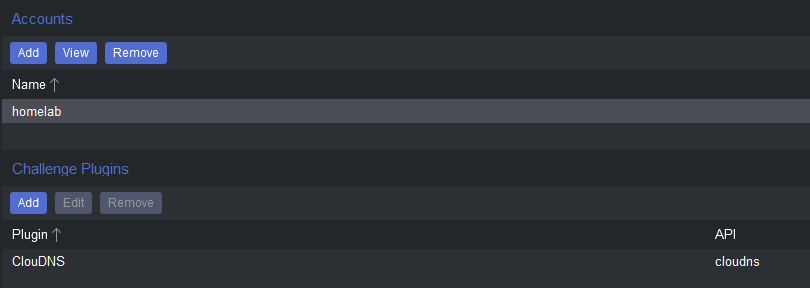
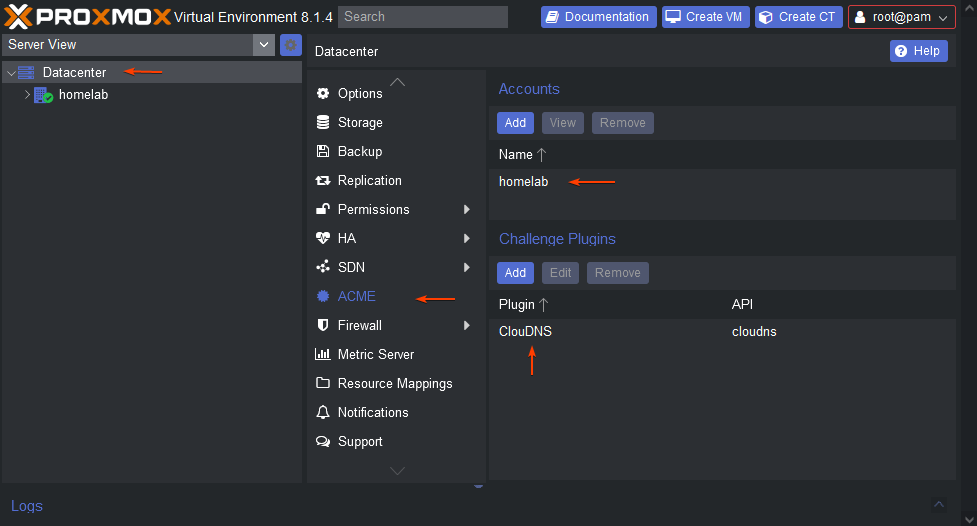
- After installation go to Datacenter > ACME and create an account used for Let’s Encrypt. Example:
- After creating Let's Encrypt account go to Datacenter > ACME and create Challenge Plugin using ClouDNS as a provider as shown in the image below. You can use either your auth-user id or sub-user id at ClouDNS. If you have not created an auth-user or sub-user, you can do this from here.
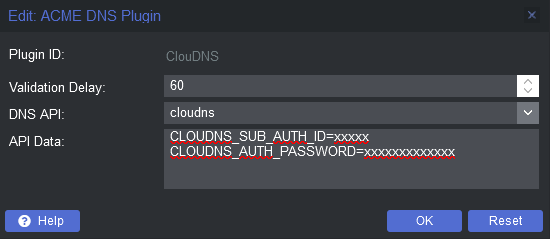
- The configuration should look like this:
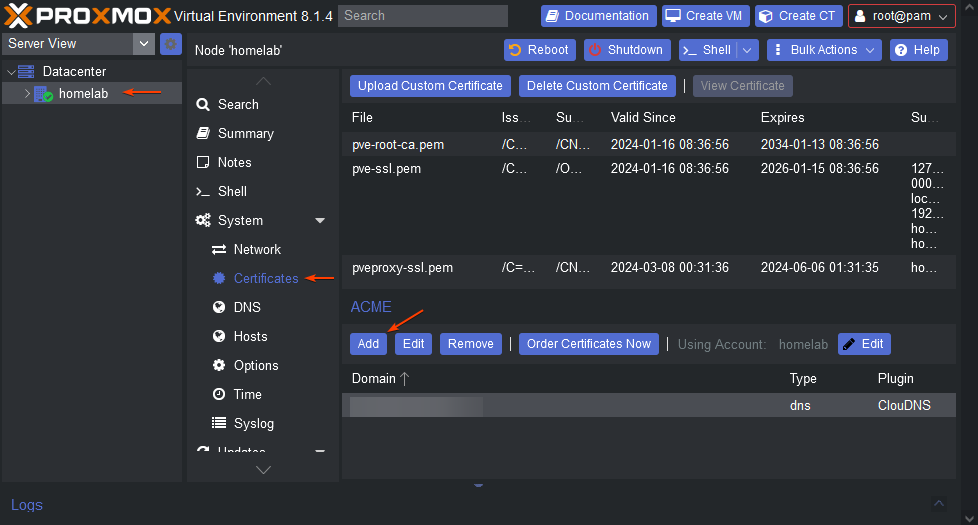
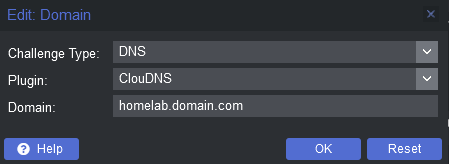
- After creating Challenge Plugin go to Node > Certificates and add ACME Domain. Select DNS as challenge and the previously created Challenge Plugin and fill in the domain name as shown in the following images:
Difference between Sectigo SSL certificates and Let's Encrypt SSL certificates
As you know, ClouDNS provides Sectigo SSL certificates. Currently, there is no difference in the security between the provided Positive SSL certificates and Let's Encrypt SSL certificates. The advantage of the Positive SSL certificates is that they are issued by Sectigo for 1 year (Let's Encrypt certificates are issued for 3 months) and the relying party warranty they have. The Let's Encrypt SSL certificates are a good option for mail servers, control panels, internal systems, and other types of administrative services, but using trusted SSL certificates is still an advantage for commercial websites.
ClouDNS DNS-01 Configuration in TurnKey confconsole (dehydrated + dns-lexicon)
Overview
TurnKey Linux appliances (including WordPress LXC containers running on Proxmox) can automatically request and renew Let’s Encrypt certificates using the confconsole (TUI).
When DNS-01 validation is selected, TurnKey uses the following stack:
confconsole → dehydrated → dns-lexicon → DNS provider APISymptoms
During certificate issuance, the process fails with an error similar to:
AttributeError: 'str' object has no attribute 'get'
ERROR: deploy_challenge hook returned with non-zero exit code
The error occurs at the stage:
Creating a TXT challenge-record with cloudnsAs a result:
- Let’s Encrypt validation fails
- No certificate is issued or renewed
Root Cause
The issue is not related to Let’s Encrypt and not a ClouDNS API outage.
The root cause is an invalid dns-lexicon configuration structure passed by confconsole.
This typically happens when:
- A ClouDNS sub-user (sub-auth ID) is used
- But the configuration is entered using
auth_idinstead ofauth_subid - dns-lexicon then receives an unexpected configuration format (string instead of dictionary)
When this happens, lexicon crashes internally and raises:
AttributeError: 'str' object has no attribute 'get'Important Context
- TurnKey does NOT use acme.sh
- acme.sh environment variables do not apply
- DNS validation is handled exclusively by dns-lexicon
Because of this, variable names and configuration formats differ from acme.sh documentation.
Correct Configuration (Solution)
Recommended: Use a ClouDNS sub-user
In the ClouDNS control panel:
- Create an API sub-user
- Grant DNS permissions only
- (Optional) Restrict API access by server IP address
confconsole → Lexicon configuration
When prompted for the Lexicon provider configuration, enter:
auth_subid: XXXXX
auth_password: YYYYYYYY
Where:
auth_subidis the ClouDNS sub-auth IDauth_passwordis the sub-user password
Important Notes
- Do not use
auth_idwhen working with a sub-user - ClouDNS API tokens are not supported by dns-lexicon
auth_passwordmust not be empty
Alternative: Master account (not recommended)
If you explicitly use the ClouDNS master account, the configuration would be:
auth_id: XXXXX
auth_password: YYYYYYYY
However, using a sub-user is strongly recommended for security reasons.
Troubleshooting Checklist
If you still see the error:
AttributeError: 'str' object has no attribute 'get'Verify that:
- The Lexicon configuration is valid YAML (one key per line)
auth_passwordis present and non-empty- You are using
auth_subidfor sub-users - The DNS zone exists and is active in ClouDNS
Result
With the correct configuration:
auth_subid
auth_password
dns-lexicon is able to:
- Create the
_acme-challengeTXT record - Complete DNS-01 validation
- Issue and automatically renew Let’s Encrypt certificates
Summary
If you encounter:
AttributeError: 'str' object has no attribute 'get'while using TurnKey confconsole + dehydrated + dns-lexicon + ClouDNS, the fix is to use auth_subid instead of auth_id when working with a ClouDNS sub-user.
Last modified: 2026-01-16